
Change History: See Who Changed What in Your Plan, and When
 Ricky Chilcott
A few weeks ago I wrote about the Contributor role and where it came from. As the Community Food Bank of Southern Arizona entered the second year of their strategic plan, dozens of staff were adding their work, and a few top-level objectives were changed or deleted by mistake.
The Contributor role makes that kind of accident less likely. But when something does go missing, the first questions are always the same: What changed? Who changed it? When? Until now, Causey couldn’t show you.
Now it can. Administrators have a new Change History page in Settings that answers all three.
What You’ll Find
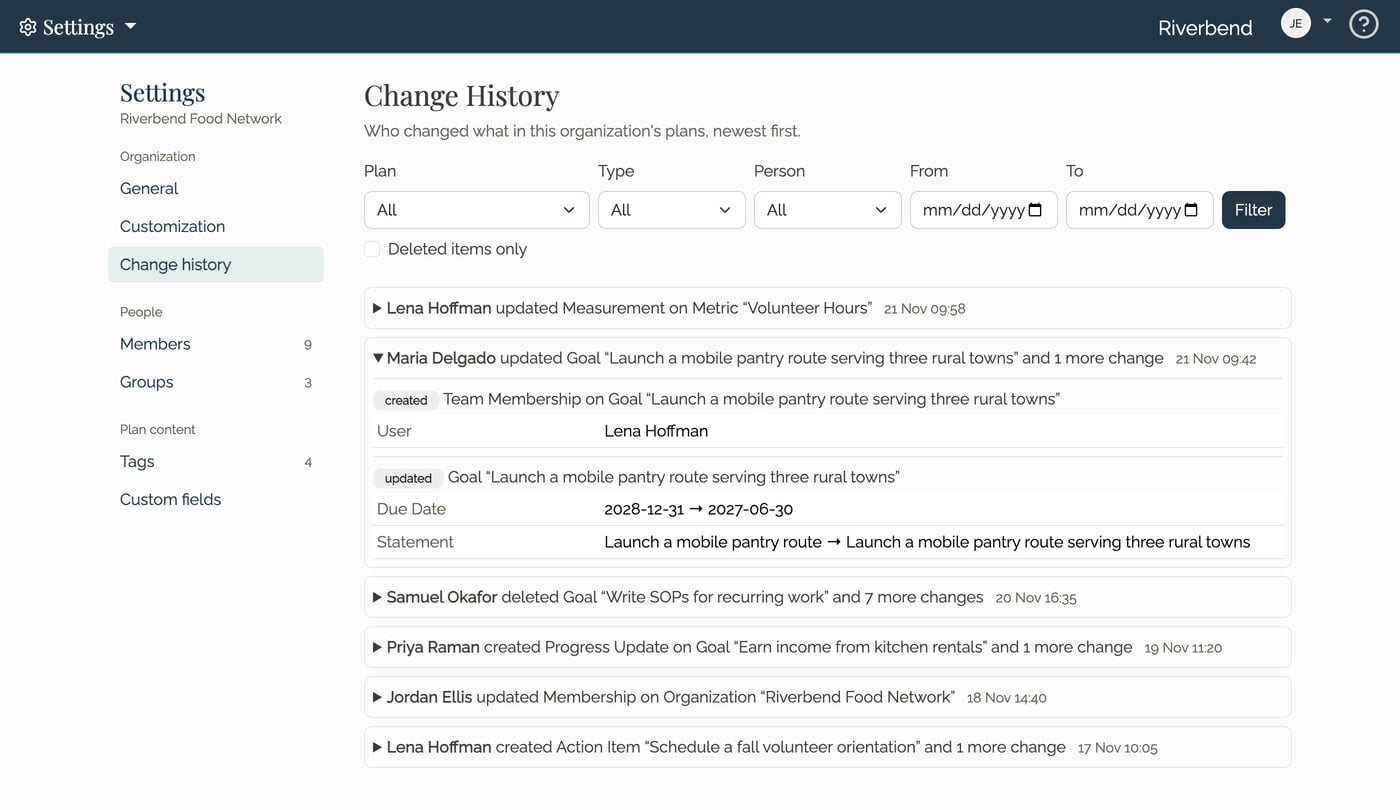
In Settings, choose “Change history” from the menu on the left. You’ll see the changes made across your organization’s plans, newest first, each with who made it and when.
One action often touches several things at once. Deleting a goal also deletes its action items, for example. Causey groups those into a single entry named after the main item, and you can open it to see each change, with the value before and after.
The history covers:
- Everything in the plan itself: focus areas, strategies, goals, action items, tasks, metrics, and the statements at the top of the plan, like your mission
- Progress updates, plus metric measurements, targets and baselines
- Champions and team members added or removed
- Who joined or left your organization, and changes to their access level
It uses your organization’s own labels, so if you call your focus areas “Pillars,” so does the history. Documents and comments aren’t part of it yet.
Finding the Change You’re Looking For
A busy organization makes a lot of changes, so you can narrow the list by plan, by type of item, by person, and by date range. There’s also a “Deleted items only” filter for the moment you’re sure something used to be there.
The type filter includes what’s attached to an item. Choosing goals, for example, also shows changes to their champions and progress updates.
Two more things to know. If someone on our support team makes a change while helping you, it reads “Causey support.” And when Causey resets a practice plan or refreshes its own sample content, none of that appears in your history.
If Something Was Deleted by Mistake
Change History is for looking. Administrators can see everything in it, but nobody in your organization can undo changes from this page.
Restoring is something we do for you. Email us at help@causey.app and tell us what you found in the history. We can bring back a deleted item along with everything that was deleted with it, so a restored goal comes back with its action items. Deleted items can be recovered for 90 days. If an edit needs to be reversed, ask us about that too. In most cases we can put the earlier version back.
Being able to point us to the exact entry saves a lot of back and forth.
Who Can See It, and How Far Back
Administrators can open Change History, and so can Advisors, who have the same access. Editors, Contributors and Viewers don’t see it.
Causey started recording changes in mid-October. How long it keeps them depends on your plan:
- Basic and Lite: 30 days
- Core: 90 days
- Solid: 365 days
The more people who help keep a plan current, the more often someone will wonder how it got the way it is. Now you can look it up instead of asking around.
If you have questions, or something in the history doesn’t look right, write to us at help@causey.app. We read every note.
Meet the author